What’s New
Improvements on macOS
Gajim runs on macOS for a while now. Thanks to our contributors, this release improves integration with the system:
- The dock icon now shows an unread counter for new messages and notifications
- When hiding Gajim, it can now be restored correctly
- Gajim can now open XMPP addresses when you click on them in your browser
- Window flickering when opening dialogs has been fixed
Message Selection and Address Completion
Selecting multiple messages to either copy or delete them has always been difficult in Gajim. But not anymore! You can now select text and extend your selection into other messages to select multiple messages. Naturally, you can then either copy or delete all selected messages at once. Copying selected messages also works using a shortcut: Ctrl+C/Cmd+C (macOS). Selecting multiple messages works with Shift+Click as well.
Gajim now offers a completion for XMPP addresses similar to mentioning group chat participants (@username) or to selecting an emoji (:emoji:). Simply start typing xmpp: and a popover will show a list of available addresses.
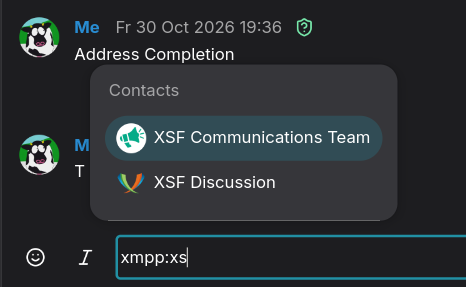
Use xmpp: to start XMPP address completion
Improvements and Fixed Issues
- Chat: Fix conversations not scrolling to bottom when selected
- Search View: Fix searching within “all contacts” and contact filtering
- Image preview now sets a minimum size for thumbnails, so that Gajim still shows preview buttons on narrow images
Have a look at the changelog for a complete list.
